
Screen Recording
Made Effortless
Capture your screen, microphone, and webcam in stunning quality. Annotation tools, scheduled recording, and 15+ export formats — all wrapped in a beautiful native Mac experience.


Made for Every Kind of Recording
Whether you're teaching, presenting, gaming, or debugging — Yfli Screen Recorder has you covered.

Tutorials & How-To Videos
Create step-by-step software tutorials with webcam overlay and annotation tools. Highlight clicks and draw attention to important UI elements.

Meetings & Presentations
Record video conferences, client calls, and team presentations. Capture both screen content and participant audio for reference and sharing.

Gaming & Live Streaming
Capture gameplay at high frame rates with system audio. Record or stream your gaming sessions with smooth performance on Apple Silicon.

Online Courses & Lectures
Record full lectures with webcam PIP, system audio, and microphone narration. Scheduled recording ensures you never miss a live session.

Bug Reports & Feedback
Quickly capture screen recordings to demonstrate bugs, share design feedback, or document workflows. A video is worth a thousand screenshots.
Everything You Need to Record
All the tools for professional-quality screen, audio, and webcam recording, in one intuitive app.
Screen Recording Free
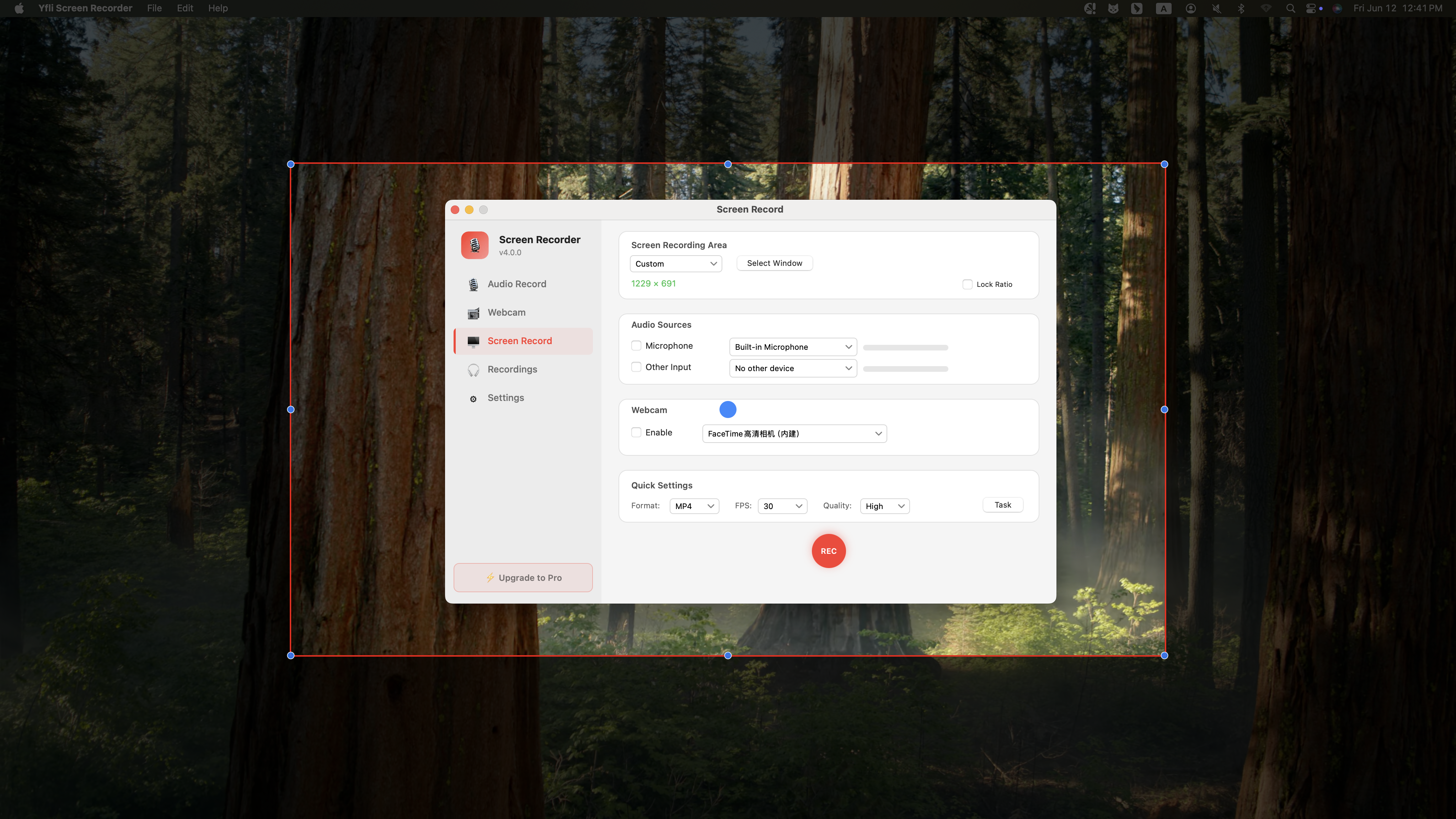
Record your entire screen, a custom region, or a single window — the choice is yours. Hardware-accelerated encoding on Apple Silicon ensures smooth 60fps capture without dropping frames. Whether you're recording a software demo at 4K or capturing a quick clip, the performance stays rock-solid.


Scheduled Recording
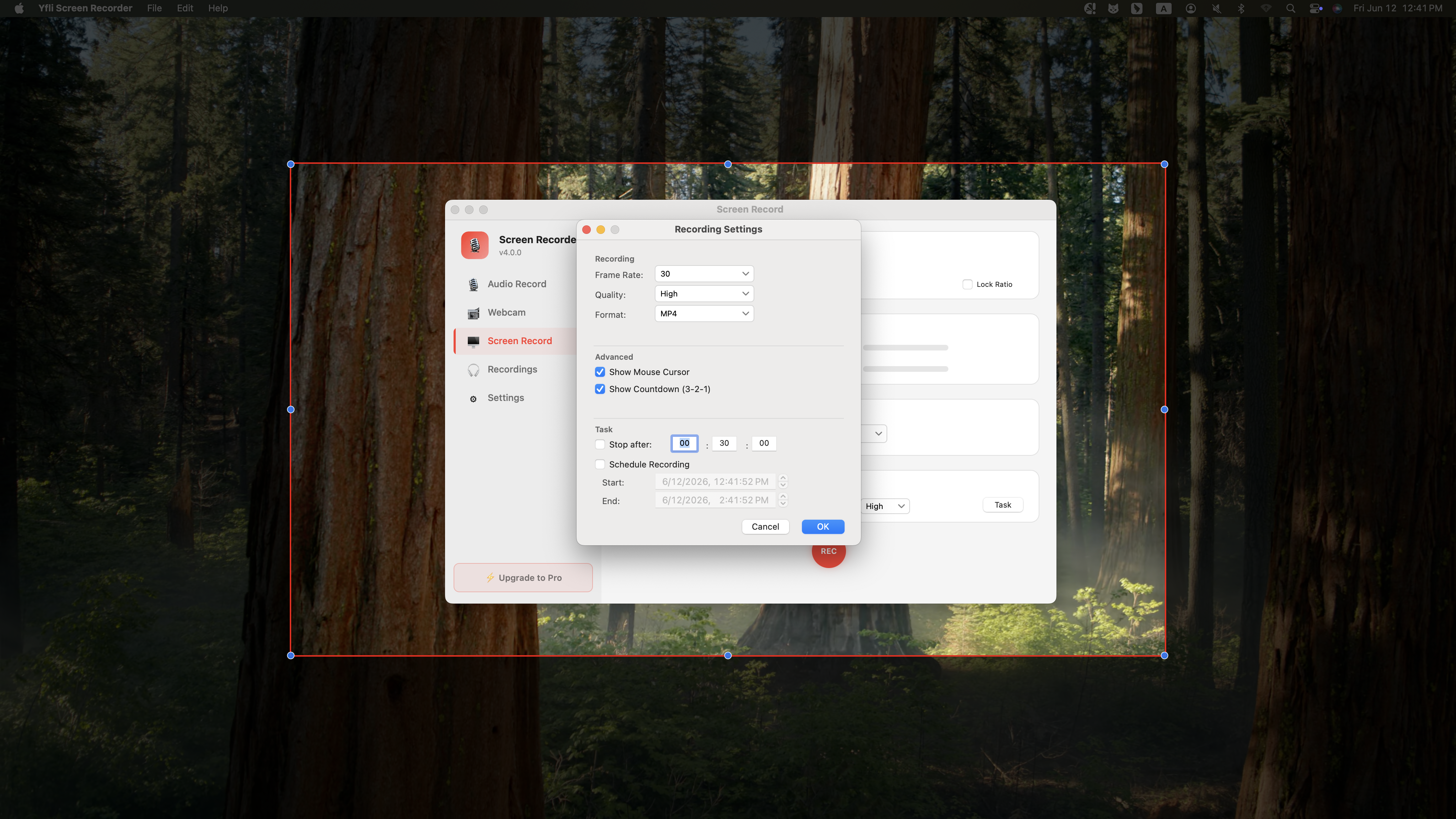
Never miss a live event again. Set the date, start time, and duration — Yfli Screen Recorder wakes up, starts capturing, and stops automatically when done. Ideal for recording webinars across time zones, live streams you can't attend, or automated daily meeting capture without lifting a finger.
Audio Recording Free
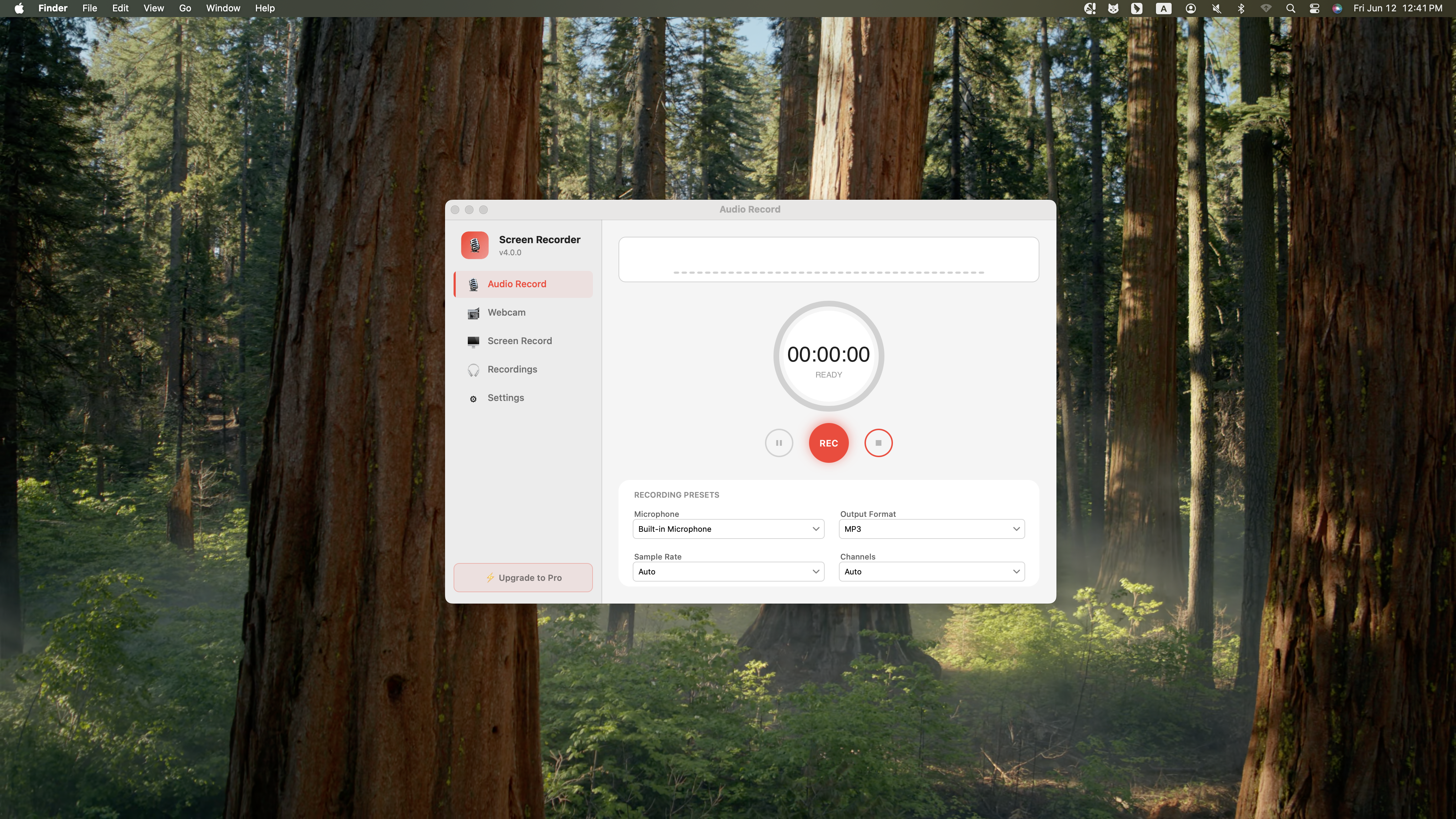
Capture crystal-clear audio from any microphone connected to your Mac. Whether you're recording a podcast episode, a voice memo, a team meeting, or streaming audio from your browser — Yfli Screen Recorder delivers studio-quality sound. Supports built-in mic, USB headsets, and professional XLR interfaces.


Webcam Overlay Free
Add your face to every recording with picture-in-picture webcam overlay. Position it anywhere on screen, resize it, or toggle it on and off mid-recording. Perfect for adding a personal touch to tutorials, building trust in sales demos, or connecting with your audience in reaction videos.
Camera Recording Free
Record pure camera footage without screen capture — perfect for talking-head videos, course introductions, and personal messages. Supports your Mac's built-in FaceTime camera or any external USB/webcam. Combines with microphone audio for polished, professional-looking video content in minutes.


Annotation Tools
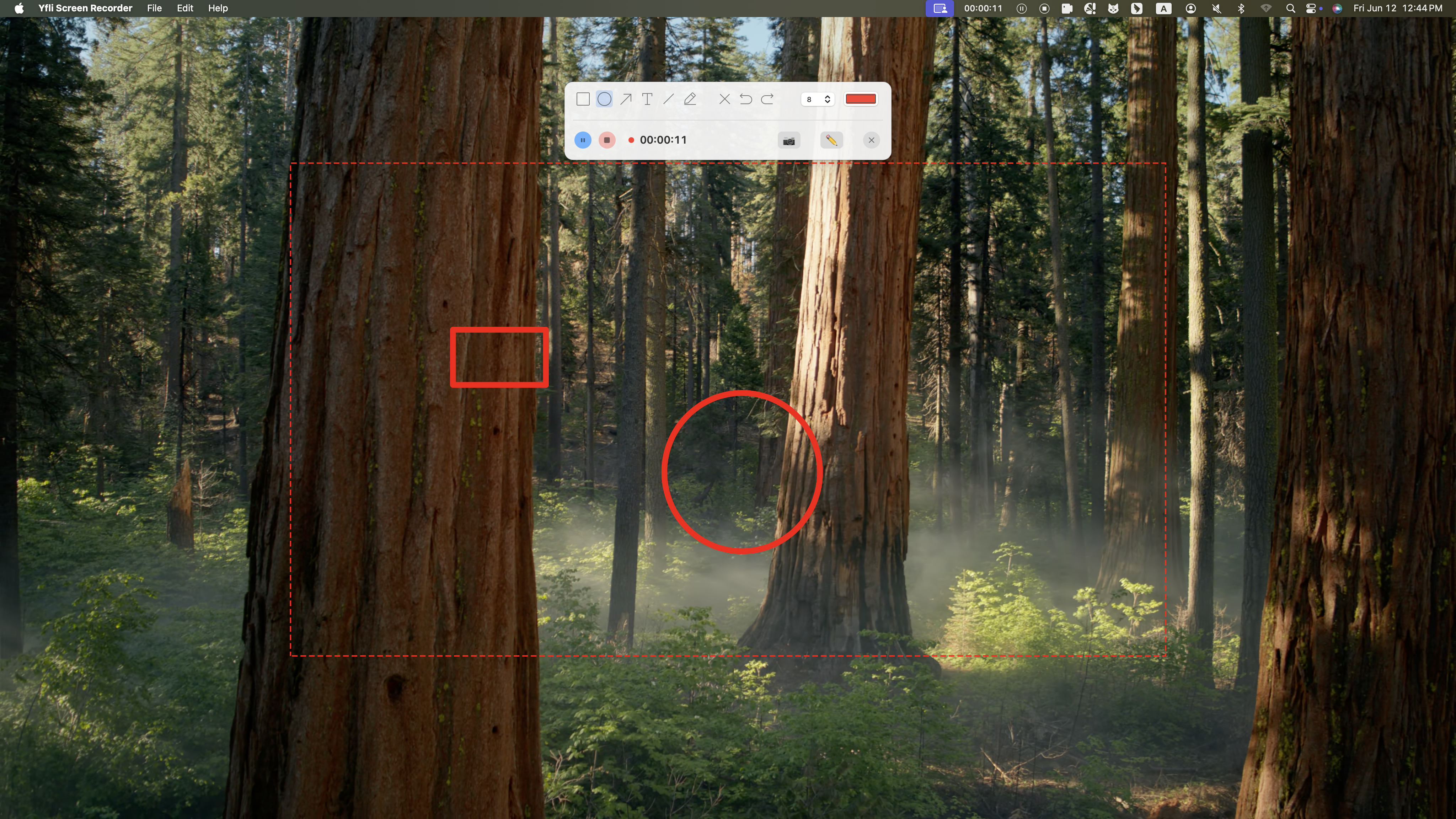
Draw attention to what matters. Use arrows, rectangles, circles, and freehand text to annotate live while recording. Highlight buttons, underline key points, or circle important details — all burned into the final video. Essential for creating clear tutorials, reporting bugs with visual context, or giving design feedback.
AI Subtitle Export New
Drag and drop any audio or video file, and AI generates timestamped subtitles — entirely on your device. Supports 99 languages with automatic detection, outputs to SRT, VTT, TXT, or LRC. No upload, no account, no internet required. Your recordings never leave your Mac.

Convert & Edit Any Video
A complete post-recording toolkit. Convert, merge, trim, rotate, and polish your media — all in one place.
Video Conversion
Video to Video
Switch between the video formats you actually use — MP4, MKV, MOV, AVCHD, 3GP and more — from everyday clips to high-definition footage. Whatever the source, the output plays smoothly on any player.
Audio to Video
Give an audio track a picture so it works on video-only platforms. Convert an MP3 to MP4 and share it on YouTube, Vimeo, or Dailymotion.
Video to Audio
Extract the audio track from any video and save it as MP3, FLAC, M4A, WAV, OGG, or WMA. Great for podcasts, ringtones, and listening on the go.
Audio to Audio
Move between common and specialized audio formats. Turn any track into an M4R ringtone for iPhone, or build a chaptered M4B file for your audiobook app.
Device Presets
Pick the device you're sending the file to — iPhone, Samsung, Android, iPad, Xbox, or TV — and get settings that just work. No codecs or resolutions to figure out yourself.
Web Presets
Ready-made settings for the platforms you actually post to. Convert once, then upload straight to YouTube, Facebook, Instagram, or TikTok.
Video Editing
Merge
Combine multiple clips into a single video.
Trim
Cut out the parts you don't need.
Rotate
Flip or rotate your video in any direction.
Crop
Reframe the shot and drop unwanted edges.
Subtitles
Add or burn in subtitle tracks.
Chapters
Mark chapters for easy navigation.
Effects
Apply filters and visual effects.
Now 100% Free — No Strings Attached
We removed all recording time limits in v4.1. Here's what changed:
Before (v4.0.4)
- Screen Recording
- Audio Recording
- Camera Recording
- Webcam PIP
30s trial limit
Now (v4.1.0) ✨
- Screen Recording
- Audio Recording
- Camera Recording
- Webcam PIP
Unlimited & Free
How It Works
Three simple steps from launch to export. No learning curve.
Choose What to Capture
Select full screen, a specific window, or drag to define a custom area. Pick your microphone and toggle the webcam overlay on or off.
Hit Record
Press record and do your thing. Use annotation tools to draw on screen, pause and resume as needed, or let the countdown timer handle it.
Export & Share
Your recording is saved as MP4, ready to share. Choose from 15+ format presets optimized for web, email, social media, or professional editing.
See It in Action
A closer look at Yfli Screen Recorder's interface and features.
Scroll to see more →
Frequently Asked Questions
Quick answers to common questions. For more details, visit our Support page.
How do I record system audio on my Mac?
Can I record my webcam along with the screen?
What export formats and quality options are available?
Latest Updates
What's new in Yfli Screen Recorder
- New redaction tools — mosaic, gaussian blur, and solid blocks hide faces, names, and account numbers in screenshots and screen recordings alike
- Redaction is available on the recording toolbar, not just the screenshot one, so you can cover something the moment it appears on screen
- Step badges — numbered markers that count up as you place them, for walking through a sequence of steps
- Annotations are now editable after you draw them — select, move, resize, restyle, re-edit text, nudge with the arrow keys, or delete
- Resizable main window — drag any edge to make it larger, and every page reflows to fit
- Fixed a crash that could occur while converting video
Ready to Start Recording?
Join thousands of Mac users who create better tutorials, presentations, and content with Yfli Screen Recorder.
Yfli Screen Recorder